Open post

5 Strategies to Build Brand Value and Accelerate Product Exposure

The market today is very competitive, and standing out and getting your product noticed is no easy feat! However, there are various strategies that can help boost your brand’s visibility and accelerate product awareness, thereby facilitating increased sales and brand loyalty. Here are five effective strategies to build brand value and drive product exposure.

Leveraging Social Media Engagement

Social media platforms are a great tool for increasing product exposure. With billions of active users, these platforms offer you the opportunity to engage directly with possible customers. But, to make the most of these platforms, you must be consistent. Post regularly, share exciting visuals, and create content that caters to your audience’s interests and needs.

Besides posting content, make an effort to engage directly with followers. Respond to their comments, share user-generated content, and host live Q&A sessions to form a connection with your audience.

Social media also enables you to present your product, share behind-the-scenes previews of your brand, and even run contests or promotions to encourage interaction. Eventually, a solid presence on social media gives you a loyal community while increasing brand exposure.

Seeking Influencer Partnerships

Influencer marketing is considered to be one of the most effective ways to reach a broader audience. When you partner with influencers whose followers match your target market, you can increase product exposure quickly and build brand trust. Influencers can provide authentic reviews, demonstrate your product, and share their experiences with their audience, all of which help lend credibility to your brand.

When choosing influencers for collaborations, try to look for individuals who have a genuine connection with their followers, as this creates more trust and engagement!

Hosting Memorable Product Launches

An impactful product launch works wonders for accelerating product exposure. It could be a virtual or physical event that launches your product in an engaging way to capture the audience’s attention. Hosting a live virtual event via social offers the advantage of reaching a global audience while keeping it interactive. During these launches, you can demonstrate the features of your new product, answer questions in real time, and even offer exclusive discounts to attendees.

In-person product launches are equally effective for creating a memorable experience. You can invite influencers, loyal customers, and media outlets to experience your product firsthand. You can also offer special promotions or limited-edition items to attendees. The goal is to make the launch event unforgettable so that it is discussed, shared and remembered long after it ends.

Developing Strategic Partnerships

Another great strategy is building mutually beneficial partnerships with other businesses or brands to expand your reach. Partnering with companies in related industries or those whose values match yours can help you tap into new customer bases. For instance, co-hosting an event or offering bundled product packages can provide value to both parties, generating exposure for both brands.

Such collaborations can include joint email marketing campaigns, shared content on blogs or social media, and even co-branded products. The shared audiences that you gain through partnerships help accelerate product awareness and improve brand credibility. Moreover, strategic partnerships create opportunities for cross-promotion, which can result in long-term growth and valuable connections.

Investing in High-Quality Visual Displays

The way your product is presented to prospective customers also plays a role in its success. High-quality visuals are necessary to attract attention. Consider investing in displays that can effectively communicate the essence of your brand and the value of your products. A backlit pop up display is one such investment. These displays are especially impactful for in-person events or trade shows, as they create a visually striking presence that draws people in.

The use of backlit displays enhances the visibility of your products and also reflects your brand’s perceived professionalism. When customers see well-made, visually appealing displays, they will be inclined to trust your brand and engage with your products.

Final Thoughts

Building brand value and accelerating product exposure is a continuous process that requires a thoughtful strategy and consistent effort!

The five strategies mentioned here are some of the many ways you can drive exposure for your product and elevate your brand’s presence. When you invest in partnerships and high-quality visuals and engage directly with your audience, you can build trust and increase visibility for your products. When you employ the right strategies, your brand can stand out, attract a loyal following, and ultimately drive success.


Open post

I Tested 5 Background Removers – Here’s What Actually Works

Background removal tools are the unsung heroes for designers, e-commerce sellers, and content creators. Whether you’re cropping product photos for Shopify, editing influencer headshots, or designing YouTube thumbnails, a clean background is non-negotiable. But with dozens of tools promising “one-click perfection,” how do you pick the right one?

I spent two weeks stress-testing five popular options across 50+ images—from frizzy hair to glassware to find out which tools deliver. Spoiler: One 100% free tool outshined even Adobe. Here’s the full breakdown, including hidden costs, workflow hacks, and why AI still struggles with lace.

Detailed Testing Methodology

To ensure fairness, I tested each tool against the same set of images with different challenges:

  • Complex edges: Windblown hair, a golden retriever’s fur, lace fabric.
  • Transparency: Wine glasses, water droplets, sunglasses.
  • Busy backgrounds: A cluttered garage, a crowded street, foliage.

Additional Testing Factors:

  • Formats tested: JPEG, PNG, and a 4K RAW file (for Photoshop).
  • Device: Chrome browser on a MacBook Pro to maintain consistent performance measurements.

Criteria for Testing

Each tool was evaluated based on the following factors:

  • Ease of Use: How intuitive is the tool? Can beginners use it without hassle?
  • Accuracy & Quality: Does the remover handle complex edges well? Is there noticeable pixelation?
  • Speed: How fast does it process images?
  • Price: Is it free or paid? Is the cost justified?
  • Extra Features: Does it offer additional functionalities like bulk removal or editing options?

The 5 Background Removers Tested (Ranked)

 Background Removers

1. Fotor AI Background Remover

After uploading images with fine details like pet fur, lace, and transparent objects, Fotor performed reasonably well on simple backgrounds but struggled with intricate details. The golden retriever’s fur appeared choppy, and the wine glass lost portions of its stem, making it unreliable for precise extractions. It was easy to use but added watermarks to free downloads.

Features:

  • AI-powered background removal for quick edits.
  • Supports JPG and PNG formats.
  • Basic editing tools for post-processing.

Strengths:

  • Simple one-click process with no learning curve.
  • Free plan offers 5 credits/month.

Weaknesses:

  • Struggled with transparency (wine glass stem was removed).
  • Watermarks on free downloads.

Pricing:

  • Free (5 credits) or $8.99/month for 500 credits.

2. Adobe Photoshop Remove Background Tool

Photoshop delivered impressive results for intricate details like lace fabric and transparent sunglasses, but required manual refinement for perfection. The tool successfully retained delicate elements but struggled with small reflective surfaces. While highly accurate, it’s best suited for professionals due to its complexity and price.

Features:

  • Advanced AI selection tools for precise background removal.
  • Supports multiple file formats, including RAW, PSD, PNG, and JPEG.
  • Manual refinement tools for professional-grade edits.

Strengths:

  • Exceptional precision, especially with complex edges.
  • Handles RAW files effortlessly.

Weaknesses:

  • Requires a $20.99/month Creative Cloud subscription.
  • Learning curve is steep for beginners.

Pricing:

  • Costs ~$0.70/image if you edit 30 photos monthly.

3. Canva Background Remover

Canva’s tool performed well on solid backgrounds but struggled with semi-transparent objects. The lace dress retained some blur, while the sunglasses lost sharpness around the edges. While it integrates seamlessly with Canva’s design tools, its quality is better suited for quick social media edits rather than detailed image cutouts.

Features:

  • One-click background removal integrated into Canva’s design platform.
  • Exports directly into Canva projects.
  • Available in Canva Pro for high-resolution downloads.

Strengths:

  • Fast processing with direct integration into Canva’s editor.
  • Works well for social media graphics and simple designs.

Weaknesses:

  • Struggled with semi-transparent fabric and objects.
  • Limited to Canva Pro users.

Pricing:

  • Free (low-res exports) or $55/month for Pro (HD + advanced features).

User Experience (UX) Review:

  • Canva’s background remover is intuitive, but it’s restricted to Pro users.

4. Remove.bg

Remove.bg performed exceptionally well, quickly removing complex edges like pet fur and lace with high accuracy. However, when tested on reflective objects like jewelry, it occasionally left faint shadows. The tool is extremely fast and integrates with APIs for bulk processing, making it ideal for e-commerce users needing mass edits.

Features:

  • AI-powered tool for instant background removal.
  • API integration for bulk processing.
  • Supports JPG and PNG formats.

Strengths:

  • AI-powered, delivering fast and highly accurate cutouts.
  • Bulk processing available for businesses.

Weaknesses:

  • Struggled with reflective objects (left slight shadows).
  • Paid plans can become costly over time.

Pricing:

  • Paid plans start at $0.18/image (200 credits/month).

5. iLovePDF2 Background Remover (Top Pick!)

After testing the same images, iLovePDF2 background remover consistently outperformed the competition. It preserved the intricate details of lace, fur, and transparent objects while offering complete customization. Unlike other tools, it provides unlimited free usage, making it the most accessible option for all users.

Features:

  • AI Algorithm: Lightning-fast background removal powered by AI.
  • Image Format: Supports TIFF, PNG, JFIF, JPG, and JPEG.
  • Color Selection: Built-in background color options.
  • Custom Background Color: Allows replacement with a custom hue using the color palette generator.
  • Custom Background Image: Enables users to upload and set a custom background image.
  • Custom Image Size: Resize images with zoom in/out controls.

Strengths:

  • 100% free with unlimited image processing.
  • Handled all edge cases accurately, including pet fur, lace textures, and glass reflections.
  • Offers customization: Change background colors, add gradients, and adjust contrast post-removal.

Weaknesses:

  • No batch processing option (images must be edited individually).

Pricing:

  • 100% free with unlimited usage.

Workflow Hack:

  • Brighten images before uploading to enhance edge detection.

The Winner: Which Background Remover Actually Works Best?

No Tool Usability Accuracy Speed Price Extra Features
1 iLovePDF2 5/5 5/5 5/5 100% Free Unlimited Usage, Customization
2 Remove.bg 5/5 5/5 5/5 $0.18/image (200 credits/month) AI-Powered
3 Canva 5/5 4/5 4/5 $55/month Design Integration
4 Photoshop 3/5 5/5 3/5 $20.99/month Advanced Editing
5 Fotor AI 4/5 3/5 4/5 $8.99/month Basic Tools

The best overall choice is iLovePDF 2 Background Remover, offering an ideal balance of accuracy, speed, and affordability (completely free). If you’re looking for a free alternative with high-quality results, Remove.bg is the next best option.

Try out these tools and let me know your experience in the comments. Which one worked best for you?


Open post

What Is an IVR System? A Complete Guide to IVR, Features, Benefits, and Common Implementation Mistakes

The King of Sales, Jeffrey Gitomer, once said,  “Every customer call is an opportunity.” 

Every customer interaction is a business opportunity for you to engage customers, understand their needs, and pitch your product or service to grow your business revenue.

But can you grab these opportunities every time?

What if a customer is trying to call you to connect with your team, but your team is busy with other customers? Maybe 10 or 100 customers call your numbers simultaneously. Who will you serve first? 

To solve this problem, businesses simply hire more people for more calling lines, which results in a significant expenditure. But I have an effective solution for you—the IVR System!

In this blog post, we will explain what the IVR system is, how it works, and the benefits of IVR in your business operations. We will also examine how to implement IVR  and some common mistakes you should avoid when utilizing the IVR system.

What is IVR?

Interactive voice response (IVR) is software that acts as a virtual receptionist for your contact center. It interacts with customers through voice assistance or manual key inputs. The IVR guides the user through a predefined menu of options and the caller’s input.

This IVR software solution eliminates the need for human agents to receive the call manually and eliminates longer holding times with an automated workflow that routes the customer and provides the information according to the caller’s need.

How does IVR work?

Customer experience starts with the first word you speak with the customer right after answering the call. But with IVR, you are in control even before the call is answered. Yes, it’s true.

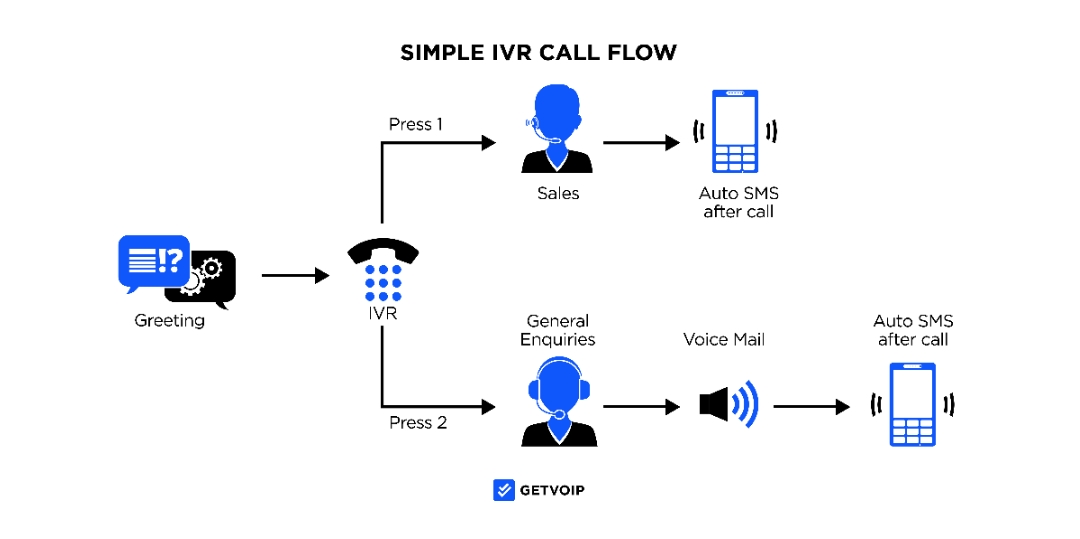
Design a similar image

                                     [ Design a similar image for IVR call flow ]

When a customer calls, in the case of a human agent, the IVR system attends the call and greets the customer with a heartwarming welcome message. This eliminates the need to hold customers on busy lines and creates a good first impression for the customer.

Next, the IVR presents a list of options such as product/service information, sales, support representative, product complaints, etc. These options will now be linked with numbers in order. Customers can choose the option they are looking for and press the right key number to select.

If the customer presses key 1, the IVR will provide detailed information about the product or service. Human agents previously did this, but you can automate such routine tasks with the help of IVR software solutions.

You might wonder if there are more choices after the options. Relax; there’s no need to worry. With dynamic IVR, you can have different choices linked to different possibilities. This helps you achieve complete efficiency in automated call handling.

Let me tell you the best part about IVR: It can be a text-based conversation or a voice-assisted conversation. You just need to store your pre-recorded voice messages for the IVR menu, and you are good to go.  

If some customers cannot find the option they need, the IVR system will transfer the call line to a human agent so that he can understand the customer query well and quickly resolve the issue. 

What Are the Key Features of IVR Systems?

Several important features of IVR systems can significantly improve your customer service operations, which we’ll explore below.

  1. Automated Call Routing

The IVR system can route the call based on the selection and connect the call to the right agent with the relevant department and skills. This feature helps reduce the need to hold customers and transfer them to another agent repeatedly.

  1. Multi-Level Menus

When the IVR was introduced, it had only limited features and basic call routing capability. But today, modern IVR software solutions come with multilevel menu options. You can have a number menu linked to more sub-menus to serve the customer efficiently, optimizing IVR implementation.

  1. Self-Service Options

Customers’ queries usually relate to product information, tracking orders, or account details. IVR systems are the perfect solution to utilize here, letting your agents focus on customers’ real issues by providing a self-service option for information retrieval.

  1. Voice Recognition & Natural Language Processing (NLP)

Modern IVR solutions are not dependent on a keypad for inputs. They come with the capability to understand voice commands through voice recognition and natural language processing(NLP) technology. Now customers can answer using voice commands, not only the key inputs.

  1. CRM Integration

CRM integration is one of the exciting features of an IVR system. You can integrate your CRM system with IVR and connect your customer database to make customer interaction more personalized and effective.

  1. Call Recording & Analytics

The call recording feature allows you to track customer call data performance and use it to improve customer interactions. IVR software solutions with analytics can provide deeper insights into call trends and customer behaviors, enhancing your overall IVR service.

What Are the Key Benefits of IVR for Customer Service?

There are several benefits to having an IVR system in customer service that we will discuss below.

  1. Reduces Call Wait Times

Traditionally, if the agents are busy with on-call lines, other customers trying to reach the support team must be put on hold. But with the IVR system, it’s different. Customer calls connect with the IVR system, and customers can choose from the available options. If the guided menu does not fulfill the customer’s requirements, they can contact human agents for further help. This helps you automate the call-handling process and reduce the wait times.

  1. Increases Operational Efficiency

As we just discussed, you can free up your human agents from repetitive tasks by automating them with an IVR software solution. This way, human agents can focus on customers’ real issues and provide better customer service, helping increase customer satisfaction and operational efficiency. By implementing IVR best practices, businesses can streamline routine tasks like providing product information, order tracking, or billing inquiries, allowing agents to handle more complex issues.

  1. Scales Easily

Suppose you are about to launch your product/service in more geographical areas. As your customer base increases, the pressure on the support team will also increase. So, how will you solve this problem? Will you hire more support staff? 

However, with the IVR software solution, you don’t have to do that, and there is no need to increase your operational costs. IVR system can handle a high volume of calls simultaneously. This allows you to scale your customer service operations as your customer base grows without making additional investments.

Whether you’re implementing IVR for customer service or expanding your business globally, an IVR system enables you to manage increased demand without compromising on service quality. With the right IVR implementation, your business can ensure that every customer interaction is smooth and effective, even as volumes rise.

  1. Cost Savings

The IVR software can automatically handle all routine and repetitive tasks that human agents must perform manually. Customers will get all the information they want through IVR, eliminating the follow-up process. Thus, you can now reduce the human resources needed for your customer service and operational costs.

4 Common IVR Implementation Mistakes and How to Avoid Them

Although an IVR system has many benefits for businesses, they fail to fully utilize it effectively. Companies may make some common mistakes while implementing an IVR system. Here are some you should care about.

  1. Overcomplicated Menu Options

Sometimes, businesses fail to optimize the IVR menu and create a long list of unnecessary options. Too many choices can overwhelm callers, and the longer wait times can frustrate them. Customers may struggle to navigate the complex menu options, leading to disconnecting the call in frustration.

How to avoid: Keep the overall structure of the IVR menu simple and logical. Group similar options and choices and use clear, concise menu options. This is a key part of IVR best practices, ensuring that your IVR service offers a smooth and intuitive experience. A well-designed IVR call flow can significantly improve efficiency and reduce call abandonment.

  1. Lack of Live Agent Support

Usually, In the IVR menu, the option to speak with the human agent is at the last or may be difficult to reach easily. Now, if a customer directly wants to talk with a live agent, they may get frustrated with the initial more extended menu option, which creates a negative customer experience.

How to avoid: Always provide an easy-to-find “talk to an agent” option within the first few menu choices. Use AI-powered call routing to direct urgent inquiries to the right department.

  1. Poor Voice Recognition

Some IVR solutions rely on voice recognition technology that struggles to understand different accents, speech patterns, or background noise. This leads to repeated errors, requiring customers to repeat themselves multiple times, which can be highly frustrating.

How to avoid: Invest in advanced AI and machine learning technologies to enhance voice recognition accuracy. AI-driven IVR can adapt to different speech patterns, improving the user experience.

  1. No Personalization

A generic IVR experience can feel impersonal and robotic. Customers appreciate when a system recognizes their past interactions, account details, or preferences. A lack of personalization makes interactions feel disconnected and inefficient.

How to avoid: Implement AI-driven IVR solutions that enable personalization. Use caller ID to recognize repeat customers, offer menu options, and provide relevant information based on previous interactions.

In Summary,

An IVR software solution is a smart way to handle customer calls without long wait times or extra costs. It helps businesses manage calls better, provide self-service options, and quickly connect customers to the right person. 

By avoiding the common mistakes in the IVR implementation we discussed, you can make the system easy to use and more helpful for your customers. Avoid common mistakes like confusing menus or hard-to-reach live agents to keep your customers happy. 

A well-planned IVR system can improve customer service, save time, and help your business grow smoothly.


Posts navigation

1 2 3 7 8 9 10 11 12 13 48 49 50
Copyright © 2026 Business MixesTheme by SiteOrigin
Scroll to top